Svelte Render Errors and Line Numbers
If a component fails to render, an error tag appears in the browser:
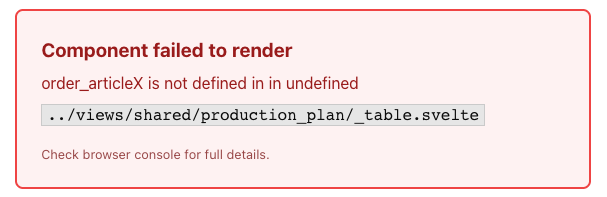
However, critical information is missing: The line number of the error. You can find this in the browser console:

I tried all the hacks and tricks, but there was no way to get this line to the error tag mentioned above, but no way.
Reason: This part is generated by an Svelte process running behind the browser’s logging system and cannot be fetched by JavaScript.
Workarounds:
- There are keyborad shortcuts to open the browser’s console.
- => seems to be the safest way.
- There are Error-trafficings services like Sentry or LogRocket
Additional Notes / Explanation
The error tag is initially generated by the server-side rendering process and then updated by the client-side/hydration process. The detailed error message is only available in the client-side process.
This means that the line number cannot be seen in the server-side process.
This would be the case if you turned hydration off.
Why is that? Because we are rendering a compiled component on the server side. There is simply no relation to the source code. However, on the client side, we are rendering directly from the source code, so Svelte is able to trace back.